The Arcive of vBulletin Modifications Site. |
|
|
|||||||


 Professional vBulletin 4 Styles - Breeze (Blue) 4.2.1 Details »»
|
|||||||||||||||||||||||||||||||
|
Professional vBulletin 4 Styles - Breeze (Blue) 4.2.1

Developer Last Online: Mar 2017 

UPDATED: Breeze Skin vBulletin 4 (All Versions)
Download Breeze Premium Skin Instructions 1. Upload the folder '/Breeze' to 'YOUR_FORUM_URL/cpstyles/Breeze' 2. In your vBulletin AdminCP go to 'Styles & Templates > Download/Upload Styles' 3. Upload the Breeze XML file and click 'Import' 4. Set the style as the default style in 'Settings > Options' Supported Layouts -CMS -Forums -Blogs To make the style work for the CMS, you have to click the edit (pencil) button next on the main page (content.php) and manually set the style choice. The CMS styling isn't very intuitive. (many people have this problem) 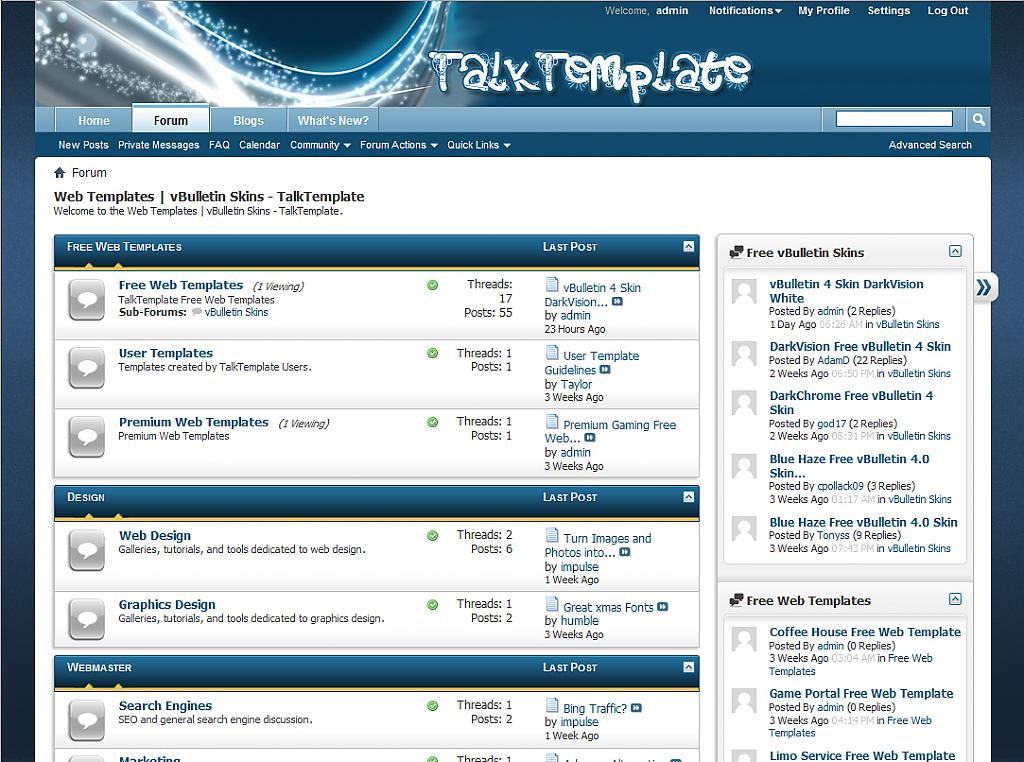 Changelog: 1.00 Released (vBulletin 4.0.1) 1.01 Updated for vBulletin 4.0.2. Various bug fixes. [Fixed] Version released upon request. 1.0.2 Updated for vBulletin 4.1.7 1.0.3 Updated for vBulletin 4.1.11 1.0.4 Updated for vBulletin 4.2.0 1.0.5 Updated for vBulletin 4 (all versions) Update Instructions: Download the attachment and upload the file 'breeze.xml' to a new style and delete the old one. Replace all images with the new folder. If you installed this style and wish to receive important style updates, please click here. Download Now
Screenshots
Show Your Support
|
|||||||||||||||||||||||||||||||
 About Developer
 Visit Web Site
 No support by the author.

| Comments |
|
#2
 01-18-2010, 07:08 PM
|
|||
|
|||

~Reserved~

|


|
#5
01-18-2010, 11:47 PM
|
|||
|
|||
|
Thanks guys. PSD is uploaded at TalkTemplate.com. (psds cant be posted here)
|


|
#8
01-19-2010, 09:00 AM
|
|||
|
|||
|
404 error going to http://www.talktemplate.com/
|
|
#10
01-20-2010, 01:19 AM
|
|||
|
|||
|
Quote:
|

 |
«
Previous Thread
|
Next Thread
»
|
|

All times are GMT. The time now is 04:10 AM.